The Enterprise Label Management Software Checklist: 9 Questions to Ask Before You Buy

The Enterprise Label Management Software Checklist: 9 Questions to Ask Before You Buy
Author Name
Kallik Role 1
Content Manager

Before you sign anything, make every enterprise label management software vendor answer nine questions in writing: how they separate your data from your artwork, whether they scale across markets and languages without a re-platform, and how they prove every label change in an audit trail. Businesses that skip these questions tend to discover the gaps after go-live. So we're helping you to be prepared and ask them now instead.
 

Why most software evaluations miss the real risk


Most label management RFPs compare feature lists: templates, approval steps, user seats. Feature lists are the easy part. The risk that actually sinks these projects shows up later, in how the platform behaves at scale, under audit, and during a regulatory change that lands with six weeks' notice. A checklist built around operational and compliance risk, not just features, surfaces that earlier, while you still have leverage in the conversation.
 

The 9 questions to ask every vendor
 

  1. Does it separate your data from your artwork design? If regulated content and creative layout live in the same file, every language variant and market version becomes a manual rebuild.
     
  2. Can it scale across markets, languages, and regulatory regions without re-platforming? Be future-proof and ask what happens at 10x your current label count rather than what happens today.
     
  3. Does it generate a complete, audit-ready trail of every label change? You should be able to show who changed what, when, and why for any label, in any market, on demand.
     
  4. Can it remove email from your approval workflow entirely? If "final_v3_APPROVED_reallyfinal.pdf" sounds familiar, this is the question that matters most.
     
  5. Does it integrate with your existing PLM, ERP, and DAM systems? A platform that can't connect to the systems you already run just adds a new silo.
     
  6. Can it absorb new regulatory requirements without a rebuild? Hazard classification changes, QR-code data carriers, and Digital Product Passport fields are all coming due across sectors, so ask how the platform handles the next one.
     
  7. What does implementation actually look like, and how long does it take? Get a real timeline with milestones, not a sales estimate.
     
  8. Can non-technical users make approved changes without IT or an agency? Every round-trip to IT or an outside agency is a day added to your time-to-market.
     
  9. What's the total cost of ownership once you count the price of errors? Licensing is one line item. Mislabeling, recalls, and agency rework are the ones that actually move the budget.

We've put all nine questions into a one-page, printable checklist so you can turn up to your vendor meeting prepared.

Download the Buyer's Checklist 

Kallik's own labeling and artwork platform, Veraciti™, was built around the answers to these nine questions – data separated from design, a full audit trail by default, and approval automation that takes email out of the loop entirely. If you're ready to see it answer each one directly, book a demo.

FAQs on Enterprise Label Management Software

What should I look for when choosing enterprise label management software? 

Look past the feature list to how the platform handles scale, audit, and change. Prioritize vendors who separate regulated data from artwork design, generate a complete audit trail automatically, automate approvals without email, integrate with your existing PLM and ERP systems, and can absorb new regulatory requirements without a rebuild.

What's the difference between label management software and artwork management software? 

Label management software governs the regulated content on a label — ingredients, warnings, claims, and compliance data — and how it's approved and tracked. Artwork management software governs the visual design and layout. Platforms that unify both in a single system, with the data kept separate from the design, avoid the duplicated work and version-control risk of running them apart.

How long does it take to implement enterprise label management software? 

Timelines vary with the number of markets, languages, and systems you're integrating, but a vendor should be able to give you a specific, milestone-based plan rather than a general estimate. Ask to see the plan for a company your size before you sign.

From Paper to Platform: What Electronic Product Information (ePI) Really Means for Labeling Teams

From Paper to Platform: What Electronic Product Information (ePI) Really Means for Labeling Teams
Author Name
Kallik Role 1
Content Manager

On September 1, the EMA published guidance on submitting electronic product information through its PLM Portal. Like many procedural updates, it would have been easy for regulatory affairs teams to skim it and move on.

But there’s an important change behind the guidance. Patient information leaflets, Summaries of Product Characteristics (SmPCs) and other product information have traditionally been managed as documents: drafted, reviewed, approved and sent for printing. Electronic product information (ePI) introduces a different way of managing that content, with defined statuses such as Draft, Submitted and Deactivated, and a growing role for digital processes in how product information is maintained.

That matters because product information can no longer be treated as finished once a document has been approved and published. It needs to be managed as a controlled record, with clear oversight of its status and ongoing changes.

The difference between a document and a dataset

Under the EU’s ePI Common Standard, electronic product information is more than a digital copy of an existing leaflet. It uses structured data based on HL7 FHIR (Fast Healthcare Interoperability Resources), allowing information to be searched, filtered and processed by digital systems, as well as accessed by patients and healthcare professionals. Simply uploading a PDF or converting a Word document into a digital file doesn’t achieve this; the information must follow the required structure and standard.

This also changes how pharmaceutical companies need to think about maintaining product information. Once content is held as structured data and linked to a regulatory record, it needs to remain consistent with the latest approved information. That means managing updates, versions and changes throughout the product’s lifecycle, rather than treating approval and publication as the end of the process.

What the September guidance actually asks of you

EMA’s guidance sets out several practical requirements for submitting and maintaining electronic product information (ePI). While submission is currently voluntary, there are specific rules around how records must be prepared, submitted and updated.

During the voluntary phase, ePI can be submitted in English, although multilingual product information will become increasingly important as the approach develops. Submissions are made through the PLM Portal, and reaching the correct status depends on getting the details right. The ePI must match the final approved annexes, the procedure number must be entered correctly, and the record must be set to ‘Submitted’ rather than left in ‘Draft’. New marketing authorization applications can remain in Draft status, while other procedures, including variations, renewals and transfers, follow different submission requirements.

There’s also a deadline to keep in mind when a marketing authorization is withdrawn or an application receives a negative opinion. According to the EMA guidance, the associated ePI must be moved out of Submitted status, either to Deactivated or back to Draft, within 15 working days of the EMA’s notification. For companies managing multiple products, markets and language versions, keeping track of these changes could become challenging without clear ownership and reliable processes.

This is where lifecycle management becomes important. Product information needs to be monitored and updated as regulatory circumstances change, with the right status, version and supporting information maintained throughout. As ePI develops, pharmaceutical companies will need to consider how their existing content management processes can support these requirements.

Who’s affected, and when

Nothing here is mandatory yet, and nothing happens overnight. The rollout is explicitly staged:

EU electronic product information (ePI) rollout, 2026–2028
WhenWhat happens
Now (voluntary phase)Centrally authorized products can submit ePI via the PLM Portal, English only
Q4 2026Phased voluntary go-live begins with centrally authorized vaccines
H1 2027Extends to centrally authorized oncology products
H2 2027Extends to remaining centrally authorized products
2027–2028Nationally authorized products follow, after individual Member States complete readiness assessments
~2028New rules generally apply EU-wide, 24 months after the legislation formally enters into force

Member States will still decide, for now, whether a given leaflet is paper, electronic, or both — and patients keep the right to request a printed copy regardless. Industry bodies like EFPIA have actually pushed for ePI to be phased in well before paper is phased out, precisely because nobody wants a gap where neither format is reliably available. So if you’re picturing a cliff edge where paper leaflets vanish overnight, that isn’t the plan, and it’s worth saying plainly: there’s no reason to panic-restructure anything this quarter.

What’s actually worth doing now

The organizations that will find this easy aren’t the ones who move fastest — they’re the ones whose product information already lives as structured, version-controlled data rather than static files scattered across departments. 

However, if their product information lives in a mix of Word documents, email threads, and whichever folder someone last saved to — this is a reasonable moment for those businesses to start closing that gap. Not because the deadline is close, but because the deadline being staged out over two years is exactly the kind of runway that gets wasted if nobody starts using it.

Prepare your business for ePI

If your product information is still scattered across shared drives, PDFs, and email threads waiting for final sign-off, the two-year runway on ePI is exactly the kind of deadline that gets missed by accident, not by neglect.

Veraciti™ keeps your label and artwork data as a single managed source of truth — version-controlled, audit-ready, and built to stay in sync the moment something changes, whether that change comes from the EMA, a new market, or your own regulatory affairs team. Speak to one of our labeling and artwork experts by filling in a form here or book a demo here.

Read more on how ePI affects labeling, or learn how Kallik works.

FAQs on Electronic Product Information (ePI)

What did the EMA's September 2026 guidance actually change? 

It set out, for the first time, exactly how marketing authorization holders should submit electronic product information for centrally authorized products through the EMA's Product Lifecycle Management (PLM) Portal — including submission statuses, which procedures require ePI, and the rule that an authorization's ePI must move out of Submitted status within 15 working days of a withdrawal or negative opinion.

Is electronic product information mandatory yet? 

No. As of late 2026, submitting ePI for centrally authorized products is voluntary, and it can be submitted in English only during this phase. Mandatory, multilingual ePI is being phased in through 2027 and 2028, starting with centrally authorized vaccines in Q4 2026 and extending to nationally authorized products once individual Member States complete readiness assessments.

Does a PDF of a leaflet count as electronic product information? 

No. ePI must be built to the EU's ePI Common Standard, based on HL7 FHIR, which makes the content structured, searchable, and machine-readable. A PDF, Word file, or other free-text document does not meet this standard, no matter how it's distributed.

What happens to a product's ePI if its marketing authorization is withdrawn? 

Any ePI in Submitted status for that product must be moved to Deactivated status within 15 working days of EMA's notice. The same 15-working-day window applies when an application receives a final negative opinion, unless re-examination is requested, in which case the ePI can remain in its current status until the final outcome is known.

Will paper patient information leaflets disappear? 

Not in the near term. Member States decide whether a given product's information is provided in paper, electronic, or both formats, and patients retain the right to request a printed copy. Industry groups including EFPIA have specifically called for ePI to be phased in well ahead of any phase-out of paper, so the two are expected to coexist for some time.

How is ePI different from a Digital Product Passport or eIFU? 

They solve related but distinct problems. ePI is specifically about structured, regulator-approved medicine information (the SmPC, package leaflet, and labeling) under the EU pharma package. eIFU covers electronic instructions for use, mainly in medical devices. A Digital Product Passport is a broader sustainability and traceability record that can apply across many product categories, including packaging. A single product can be subject to more than one of these requirements at once.

What should a labeling or regulatory affairs team do now, if ePI isn't mandatory yet? 

The most useful step is auditing whether your current product information already exists as structured, version-controlled, centrally managed content rather than static files. Teams that already manage their SmPC, Annex II, and labeling text this way will find the transition to ePI straightforward; teams that don't have a two-year runway to close that gap before it becomes mandatory.

10 Reasons Labeling Software Implementations Fail

10 Reasons Labeling Software Implementations Fail
Author Name
Kallik Role 1
Content Manager

Rolling out labeling and artwork management software should accelerate your operations and strengthen compliance. Yet many implementations stall, exceed budgets, or fail to deliver expected results. For packaging and labeling leaders at regulated manufacturers, understanding why projects go wrong is the first step toward getting them right.

The reasons for failure often trace back to decisions made early in the project. Kallik helps organizations in pharmaceuticals, medical devices, chemicals, and consumer goods navigate these challenges with structured workflows and proven implementation approaches. Here are the ten most common barriers to success.


Key Takeaways: Why Labeling Software Implementations Fail
 

  • Poor requirements definition leads to platform misalignment, delayed rollouts, and missed regulatory obligations
  • Insufficient stakeholder involvement causes resistance to adoption and gaps in critical workflow configurations
  • Underestimating data migration complexity results in incomplete asset libraries and version control failures
  • Skipping change management planning creates user frustration and undermines the benefits of new labeling technology
  • Frequently asked questions about implementation issues and advice on how to solve them
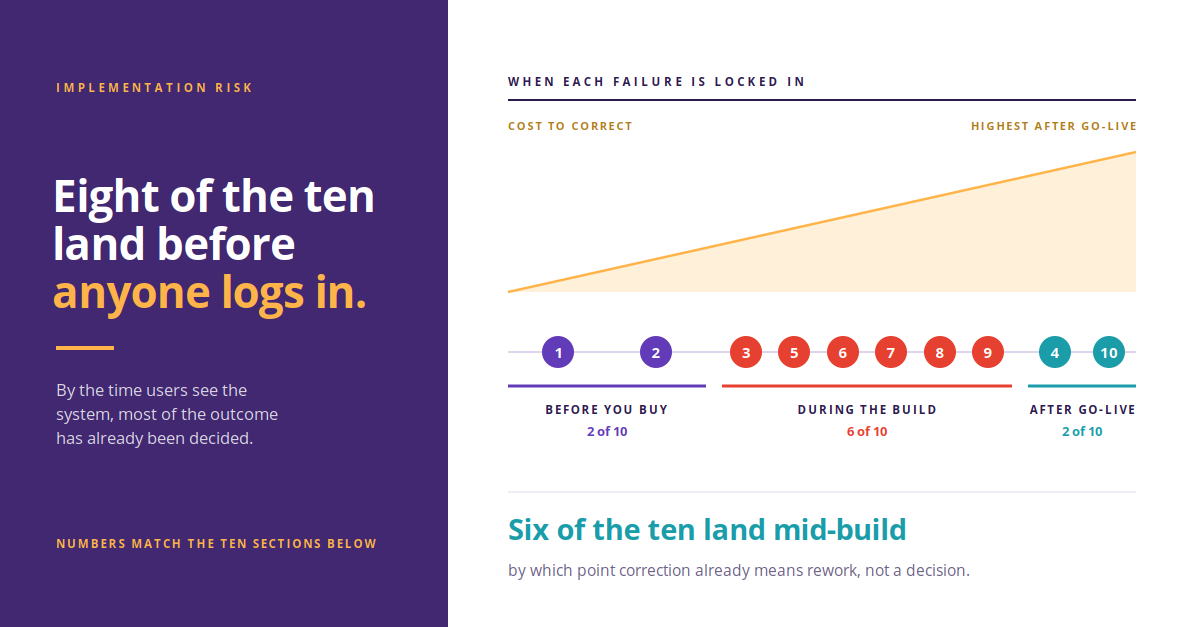


Why Labeling and Artwork Management Software Implementations Go Wrong


1. Unclear Business Requirements

Many implementations begin without a complete picture of what the organization needs. Teams focus on features rather than outcomes, selecting software based on demos rather than documented requirements.

This disconnect between expectations and reality surfaces during deployment when the platform cannot support specific regulatory workflows or regional labeling variations. The fix requires going back to stakeholders, mapping current processes, and defining measurable success criteria before vendor selection.

2. Insufficient Stakeholder Involvement

Labeling touches regulatory affairs, quality, marketing, packaging, and manufacturing. When implementation teams exclude key departments, the system ends up serving only a portion of the organization's needs.

This often results in workarounds, shadow systems, and resistance to adoption. Early and ongoing involvement from all affected teams ensures the platform configuration reflects actual approval workflows and hierarchies.

3. Underestimating Data Migration Complexity

Moving existing labels, artwork files, and content libraries into a new system is rarely straightforward. Organizations frequently underestimate the time and resources required to clean, standardize, and validate their existing assets.

Without a structured approach, teams end up with incomplete libraries, duplicate files, and broken version histories. AI-enabled onboarding tools can accelerate this process by digitizing existing labels and extracting reusable components.

4. Neglecting Change Management

New software changes how people work. Without a structured change management plan, users default to familiar habits or resist the new system entirely.

Successful implementations include role-based training, clear communication about why the change is happening, and dedicated support during the transition period. Change management is not optional when dealing with thousands of labels across multiple markets.

5. Lack of Integration Planning

Labeling software does not exist in isolation. It needs to connect with ERP systems, PLM platforms, regulatory databases, and print management infrastructure.

When integration planning happens late in the project, teams discover technical barriers that delay go-live or require expensive custom development. Planning integrations from the start ensures data flows correctly across your enterprise systems.

6. Inadequate Workflow Configuration

Every organization has unique approval processes, regulatory requirements, and market-specific workflows. Treating workflow configuration as an afterthought leads to systems that do not match how teams actually work.

This creates bottlenecks, skipped approvals, and compliance risks. Taking time upfront to document and configure workflows correctly pays dividends throughout the platform's lifecycle.

7. Poor Vendor Communication

Implementation success depends on clear, consistent communication between your team and the software vendor. When expectations are unclear or feedback loops break down, misalignment compounds over time.

Establishing regular checkpoints, escalation paths, and a single point of contact on both sides keeps projects on track and surfaces issues before they become critical.

8. Unrealistic Timelines

Pressure to launch quickly leads to compressed timelines that sacrifice thorough testing, training, and configuration. Teams rush through critical phases and inherit problems that persist long after go-live.

Building in adequate time for user acceptance testing, parallel running, and refinement protects your investment and ensures the system works correctly from day one.

9. Skipping Validation Requirements

In regulated industries, labeling software must meet validation requirements. Skipping or shortcutting validation creates compliance exposure and can require costly remediation later.

Understanding your regulatory obligations early and building validation activities into the project plan ensures audit readiness from the start.

10. No Post-Implementation Support Plan

Going live is not the finish line. Without a plan for ongoing support, optimization, and user feedback, initial gains erode over time as workarounds accumulate and configurations drift.

A clear support structure, regular system reviews, and a pathway for continuous improvement ensure your labeling management platform delivers value year after year.
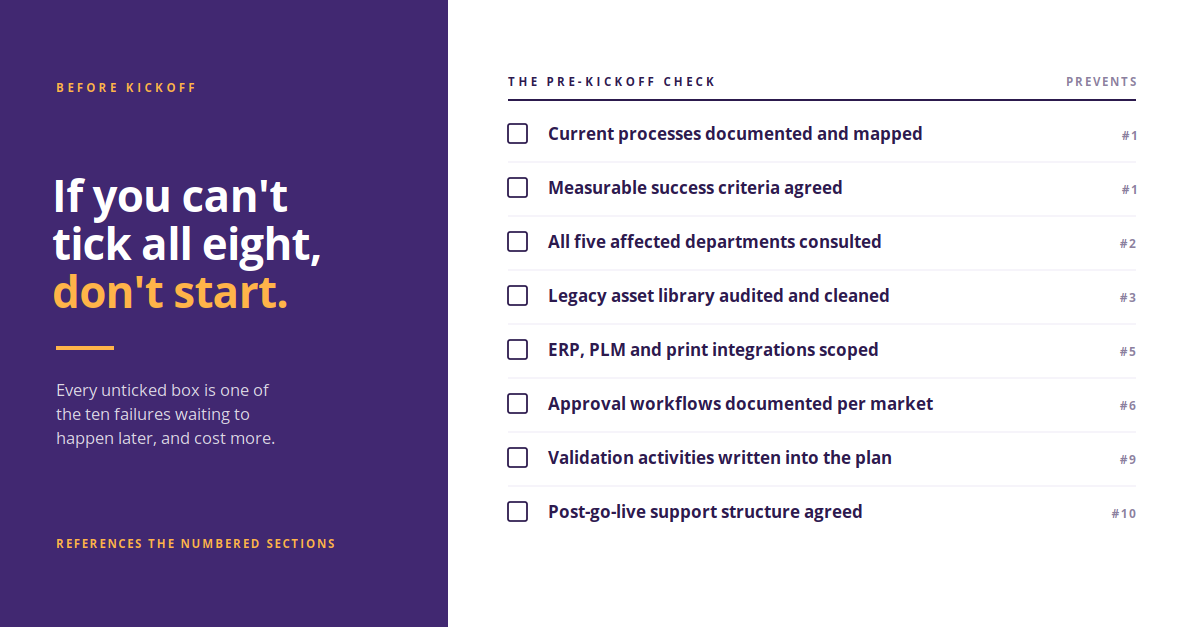


How to Set Your Implementation Up for Success


Avoiding these pitfalls requires preparation, collaboration, and realistic expectations. Start by documenting your current processes and pain points. Involve stakeholders from every affected department early. Build time into your timeline for thorough testing and training.

Kallik helps regulated manufacturers navigate implementation complexity through structured workflows, AI-enabled label onboarding, and cloud-based artwork management. With over twenty years of experience supporting global enterprises, the platform is designed to reduce compliance risk and accelerate time to market.

If you are evaluating labeling and artwork management software, understanding these common failure points can help you ask better questions and make more informed decisions.


What’s Next: Preparing for a Successful Implementation


Knowing where implementations go wrong is only half the picture. The other half is knowing how to set yours up to go right from the very first conversation. That’s why this article is the first in a short series we’re running with Beth Peckover, Kallik’s Chief Delivery Officer. Beth has led labeling and artwork management rollouts for some of the world's biggest regulated manufacturers, and across the series she’ll share the practical lessons that separate smooth implementations from stalled ones.

In our next post, Beth will walk through how to prepare for implementation before your project kicks off, from defining requirements and bringing the right stakeholders to the table to planning for data migration, integration, and validation. Follow Kallik on LinkedIn or check back on our blog so you don’t miss it. In the meantime, if you’d like to speak with the Kallik team for expert advice on your own implementation, you can call us on +44 (0) 1827 318100, email us at enquiries@kallik.com, or fill in a form here.
 

FAQs about Why Labeling Software Implementations Fail
 

What is the most common reason labeling software implementations fail? 

Unclear business requirements top the list. When organizations select software without documenting specific needs and workflows, the platform often fails to support critical processes.

This leads to workarounds, user frustration, and missed regulatory obligations. Thorough requirements gathering before vendor selection prevents this outcome.

How long should a labeling software implementation take? 

Implementation timelines vary based on complexity, but rushing creates problems. Most enterprise deployments require several months to complete requirements gathering, configuration, data migration, testing, and training properly.

Building adequate time into your project plan protects your investment and ensures a stable launch.

Why is stakeholder involvement important in labeling software projects? 

Labeling touches multiple departments including regulatory, quality, marketing, and manufacturing. Excluding any group leads to workflow gaps and resistance to adoption.

Early involvement ensures the system configuration reflects how teams actually work and secures buy-in across the organization.

What role does data migration play in implementation success? 

Data migration is often underestimated. Moving existing labels, artwork, and content into a new system requires cleaning, standardization, and validation.

Incomplete migration leads to duplicate files, missing assets, and broken version histories that undermine the new platform's value.

How can organizations avoid implementation delays? 

Planning integration requirements, configuring workflows thoroughly, and building in testing time all help prevent delays.

Establishing clear communication with your vendor and maintaining realistic expectations about timelines keeps projects on track.

What happens if validation requirements are skipped? 

In regulated industries, skipping validation creates compliance exposure. Auditors may question system integrity, and remediation after go-live is more expensive than doing it correctly upfront.

Building validation activities into your project plan from the start ensures audit readiness and protects against regulatory risk.

Regulatory Label Changes: From Months to One Edit

Regulatory Label Changes: From Months to One Edit
Author Name
Kallik Role 1
Content Manager

PPWR recently became enforceable across the EU and despite most teams knowing it was coming, plenty still weren't ready. For the most part, this was not because they had misread the regulation, but rather because they just couldn't move fast enough once they knew what it meant.

Regulations affecting packaging are being introduced and updated all the time with sustainability and patient safety (quite rightly) becoming increasingly scrutinized. We’ve mapped out some of the biggest and most pressing ones in our latest free resource, but it takes a lot more than being aware of the regulation to be prepared for the regulation – especially when it could change again at any moment!

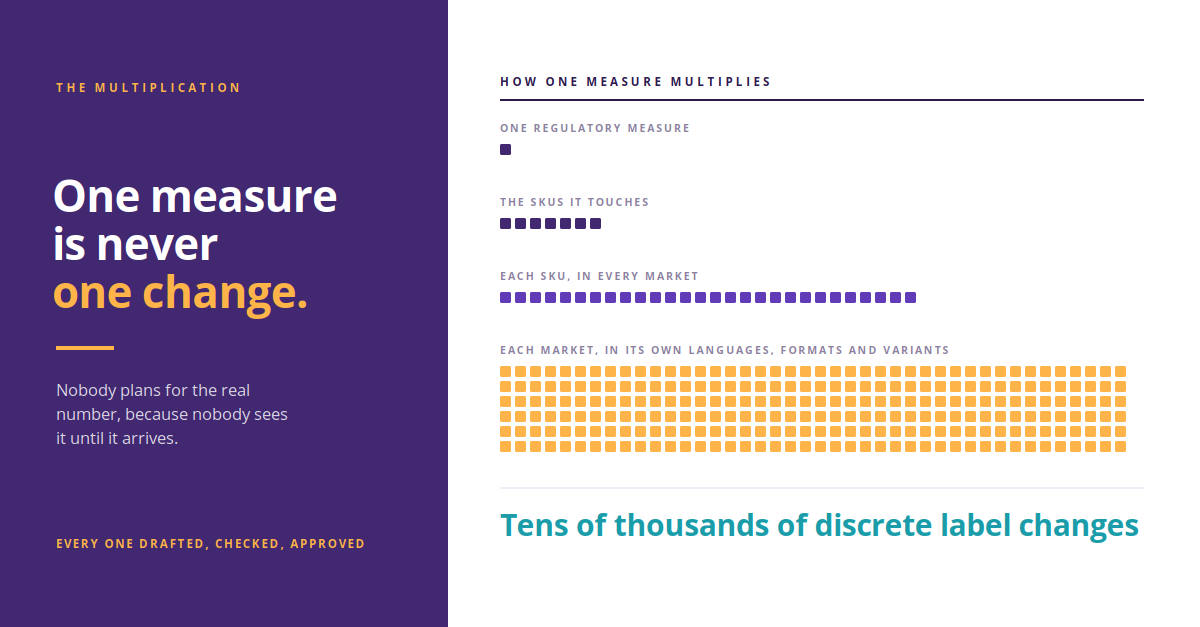
And if that’s not enough to have your regulatory affairs team stressed out, then do the multiplication and realize that each measure touches a set of SKUs and each SKU appears in several markets and each market wants its own languages, its own pack formats, its own regional variants. Seventeen regulations suddenly become tens of thousands of discrete label changes, all of which needs drafting, checking, approving and evidencing. Unfortunately, we often find that nobody plans for that number because nobody sees it until it arrives.
 

Download the free PDF


Why Packaging Updates Are Simpler Than You Probably Think


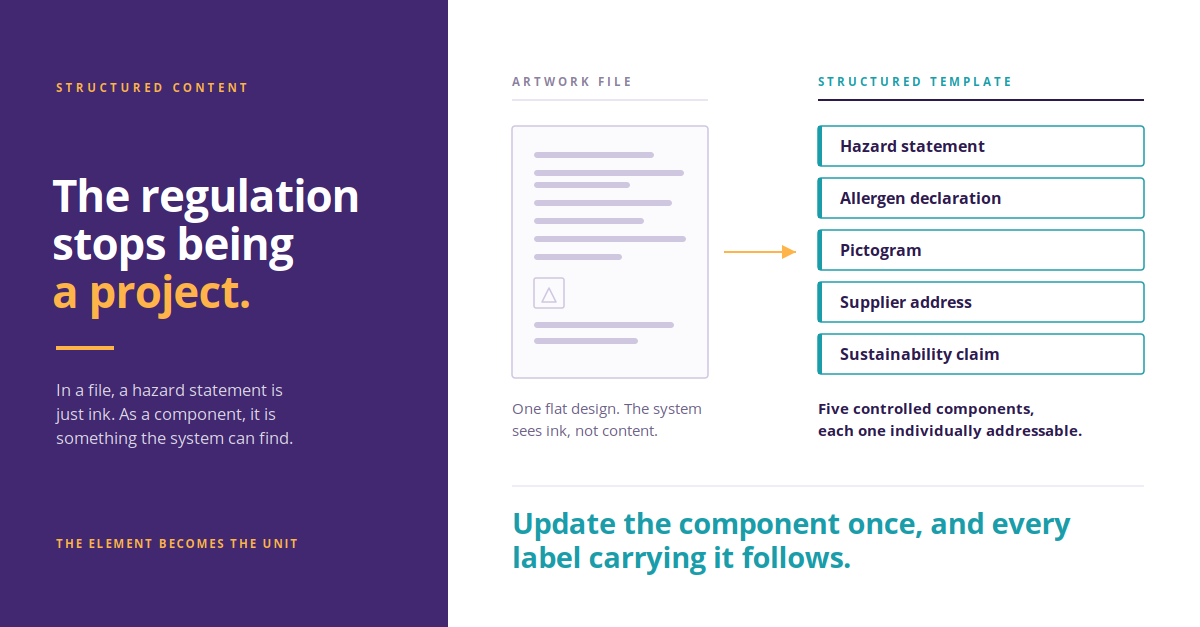
If you strip away the legal text, the reality of a regulation update is that a controlled element on your label has changed. Whether it’s a hazard statement, an allergen declaration, a supplier address, a sustainability claim, the work underneath is the same. This therefore raises the question: if the work is the same every time, why does every regulation land like a brand new crisis for so many businesses?


Your Process is Holding You Back


Most organizations still hold their labels as artwork files. Unfortunately, in that world, a hazard statement is not something your system knows about or can easily locate and update for you. So when the statement changes, you can't update the statement. You can only open files and go looking for it.

Which is why the first few weeks (or even months) of every regulatory project are spent on a question that has nothing to do with regulation: which of our labels does this actually affect? Somebody builds a spreadsheet while somebody else cross-references it against the product master and then a third person finds four SKUs that were missed, usually late, usually in a market nobody thought about. And then this all gets repeated in full, from scratch, every single time. Sound familiar?


What Changes When the Element is the Unit


Now imagine the same seventeen measures landing on a library where every phrase, symbol, pictogram, warning and image is stored as its own approved, reusable asset, and templates assemble those assets into finished labels. You already know where every element is used, because the relationship is data rather than memory.

Update the hazard statement once, with one simple click, and it flows to every label that carries it, in every language, with the version history sitting behind it. The regulation stops being a project and instead becomes a simple edit. That is the difference between a team that spends 2027 reacting and a team that spends it prepared. Which would you prefer?


Where Kallik Comes In


Veraciti™ was built for regulated manufacturers from the start rather than adapted for them later, and it shows in the parts that usually hurt most.

Where Used answers the scoping question instantly, so the two weeks of archaeology never happen. Cloud Designer lets your own people build and amend labels without specialist desktop software or a third-party studio on retainer. And the approval workflows were designed around genuinely regulated sign-off, with the audit trail produced as a byproduct of the work rather than reconstructed afterward for an inspector.

The objection we most often hear when it comes to switching from emails and spreadsheets to a fully end-to-end software like ours is: migration. Twenty years of accumulated artwork files, and the reasonable fear that moving them will be long, complicated and painful. That is exactly why we built AToM, an AI-driven tool which digitizes existing labels into structured, reusable components automatically and accurately. 

We help our customers to reach full regulatory compliance and hold it there. The days of headaches and stress from regulatory updates are gone, and instead of hiring a team to help you manage the changes, you can simply make thousands of changes with the click of a button. 


See the Full Picture and Stay Ahead 


We've put some of the biggest and most important regulation updates in a single infographic, grouped by industry, mapped by market and sequenced by deadline. It's free, it's detailed, and it's the clearest view we've found of what the next few years actually look like.

Interested in learning more? Why not book in for a free, no-obligation chat with one of our label and artwork management experts by calling +44 (0) 1827 318100, emailing enquiries@kallik.com, or filling in a form here. Alternatively, learn more about how Kallik works here.
 

Download the free PDF

FAQs about regulatory label changes

Why do regulatory label changes take so long? 

Most of the time goes on scoping rather than on the change itself. When labels are held as artwork files, a hazard statement or allergen declaration exists only as ink inside a PDF, so the system cannot tell you which labels contain it. Teams build spreadsheets, cross-reference them against the product master, and still miss SKUs in markets nobody thought about — and the whole exercise is repeated from scratch for every new regulation.

What is structured content in label management? 

Structured content means storing every phrase, symbol, pictogram, warning, and image as its own approved, reusable asset, with templates assembling those assets into finished labels. The label becomes a set of relationships between controlled elements rather than a flat design file. That is what allows a change to one element to flow through to every label that carries it, in every language, with the version history behind it.

How do you find every label affected by a regulation change? 

If labels are stored as structured content, the system already knows where every element is used, because the relationship is recorded as data rather than held in someone's memory. A query returns every artwork containing a given phrase or symbol in seconds. In Kallik's Veraciti™, the Where Used feature does this and pulls the affected labels into a single project, so they can be updated together and approved in one sign-off rather than opened one at a time.

What is the difference between an artwork file and a label template? 

An artwork file is a finished design, and the regulatory content inside it is not separately identifiable to the system. A label template is a structure that assembles approved, individually controlled components into a finished label. The practical difference shows up when something changes: an artwork file has to be found and edited by hand, while a template updates automatically when the component it references is updated.

What happens to existing artwork when moving to a structured labeling system? 

Existing artwork does not have to be rebuilt by hand. Kallik's AToM is an AI-driven migration tool that reads existing labels and artwork, breaks them down into their areas of content, and builds structured, reusable templates automatically. It identifies and removes duplicate phrases and symbols along the way, so the result is a deduplicated library rather than a copy of the original file store.


What Is Label Artwork Management Software? A Buyer's Guide

What Is Label Artwork Management Software? A Buyer's Guide
Author Name
Kallik Role 1
Content Manager

One out-of-date hazard symbol can hold a shipment at customs. One mismatched ingredient statement can trigger a recall across three continents. For organizations managing thousands of SKUs across dozens of markets, label and artwork accuracy is a major business risk.

Most companies only start shopping for label artwork management software once that risk becomes visible. This guide explains what the software actually does, which features matter, and how to compare vendors before you commit.

What is label artwork management software?

Label artwork management software is a centralized platform that manages the full lifecycle of product labels and packaging artwork – content creation, translation, review, approval, version control, and print-ready output – in one controlled system. It replaces the spreadsheets, shared drives, email approval chains, and disconnected design tools that most organizations begin with, giving every team a single source of truth for label content and artwork.

The strongest platforms combine two capabilities that are often sold separately: artwork management (design, proofing, approval workflows) and labeling management (structured content, phrases, symbols, regulatory data). Keeping them in one system is what removes the copy-paste errors that cause compliance failures.


Who needs it?

Label artwork management software is built for regulated and high-complexity industries, including:

  • Pharmaceuticals and life sciences
  • Medical devices and IVD
  • Chemicals, oil, and lubricants
  • Cosmetics and personal care
  • Food, beverage, and consumer goods

If your business faces multi-market regulatory change, frequent artwork revisions, or audits that require a defensible history of every label version, manual processes will eventually become the bottleneck.


Core features to look for

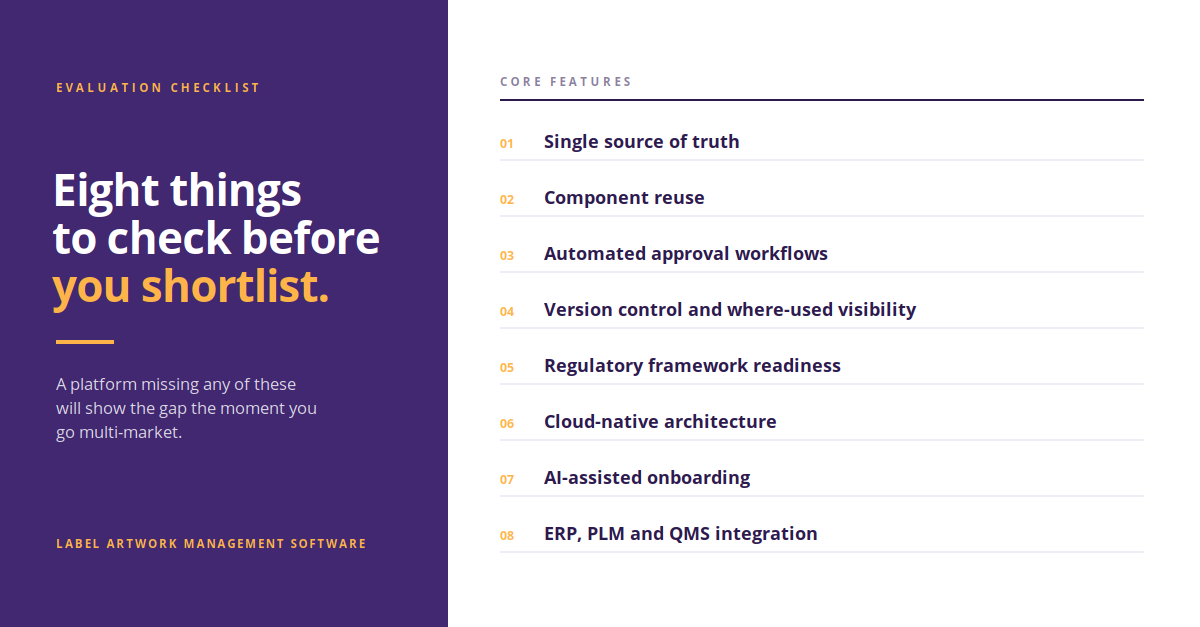
Use this as your evaluation checklist:

Single source of truth: one governed repository for all label content, artwork, images, and symbols.

Component reuse: approved phrases, warnings, and symbols reused across SKUs instead of recreated each time.

Automated approval workflows: routed reviews with electronic signatures and full audit trails.

Version control and "where used" visibility: instantly see every product affected by a single content change.

Regulatory readiness: support for frameworks such as EU MDR, 21 CFR Part 211, CLP, and Digital Product Passports.

Cloud-native architecture: global access, faster deployment, and no infrastructure burden.

AI-assisted onboarding: automated migration of legacy labels so implementation is measured in weeks, not years.

Integration: connections to ERP, PLM, and QMS so label data stays synchronized with product data.

Shortlist

Label artwork management vs. label printing software


These categories are frequently confused, and the difference matters when you build your shortlist.

Label printing software vs. label artwork management software
CriteriaLabel printing softwareLabel artwork management software
Primary purposeDesign and print barcodes and labelsGovern the entire label and artwork lifecycle
Approval workflowsMinimal or manualAutomated, audited, signature-controlled
Best fitSmall to mid-sized, print-focused operationsGlobal, regulated, multi-SKU enterprises
Compliance evidenceLimitedFull audit trail and version history

If your requirement is simply printing labels on the production line, printing software may be enough. If you need to prove why a label says what it says, you need artwork management.


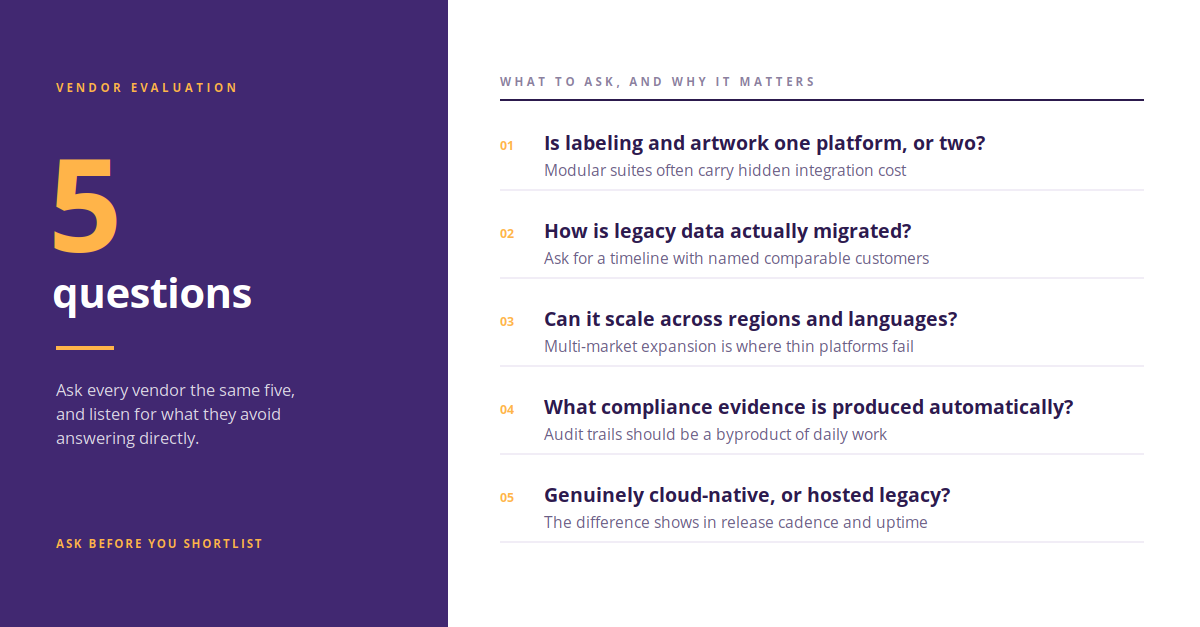
Five questions to ask every vendor

  1. Is labeling and artwork one platform or two integrated products? Modular suites often carry hidden integration cost.
  2. How long does implementation take, and how is legacy data migrated? Ask for a realistic onboarding timeline with named comparable customers.
  3. Can it scale across regions and languages? Multi-market expansion is where thin platforms fail.
  4. What compliance evidence does it produce automatically? Audit trails should be a byproduct of daily work, not a manual exercise.
  5. Is it genuinely cloud-native, or a hosted legacy system? The difference shows up in release cadence and uptime.

To see how leading platforms stack up on these criteria, compare Kallik vs. Loftware, Kallik vs. Esko, and Kallik vs. BarTender.

Vender Evaluation


The bottom line

Label artwork management software pays for itself in avoided rework, faster time to market, and audit confidence. The right choice depends on your scale and regulatory exposure: smaller, print-led operations may be well served by lighter tools, while global regulated enterprises need a unified platform built for complexity.

Kallik's Veraciti™ brings labeling and artwork together in one cloud-native platform designed for regulated industries. Book a demo to see it applied to your portfolio.


FAQs on label artwork management software

What is label artwork management software? 

Label artwork management software is a centralized platform that controls the full lifecycle of product labels and packaging artwork, including content creation, translation, review, approval, version control, and print-ready output. It gives regulated organizations a single source of truth and an audit trail for every label change.

What is the difference between artwork management and labeling management? 

Artwork management covers the visual design, proofing, and approval of packaging and label artwork. Labeling management covers the structured content within a label, such as approved phrases, warnings, symbols, and regulatory data. Unified platforms handle both, which removes the manual transfer errors that occur when the two are managed separately.

Which industries use label artwork management software? 

It is used most heavily in regulated sectors: pharmaceuticals, medical devices, chemicals, cosmetics, food and beverage, and consumer goods. These industries face frequent regulatory change, multi-market labeling requirements, and audits that demand a documented history of every label version.

How long does it take to implement label artwork management software? 

Timelines vary with portfolio size and data quality. Legacy on-premise projects historically ran for a year or more, while cloud-native platforms with AI-assisted label migration can shorten onboarding significantly. Ask each vendor for a phased plan and reference customers of similar complexity.

Do I need label artwork management software if I already have label printing software? 

Often, yes. Printing software creates and outputs labels but typically lacks controlled approval workflows, version history, and compliance evidence. If you must demonstrate to a regulator how a label was approved and by whom, printing software alone will not cover it.

How AI Simplifies Label and Artwork Migration

How AI Simplifies Label and Artwork Migration
Author Name
Kallik Role 1
Content Manager

Every labeling software project has a moment where the enthusiasm meets the archive. Someone opens the folder containing fifteen years of artwork – PDFs, InDesign files, scanned proofs, a spreadsheet that was supposed to be the master list – and the question becomes very real. How does all of that get into the new system?

For most vendors, the answer is people. A migration team, a long project plan, and months of copying content across by hand while your team keeps the current process running alongside it. That cost is why plenty of organizations stay on a system they've outgrown. The pain of switching looks worse than the pain of staying. AToM exists to change that math.

Artwork


Why Migration is the Part Everyone Dreads

Manual onboarding is often slow and painful, but the real problem is what manual work does to accuracy.

Someone reads a value off a legacy label and types it into a new template. Someone interprets an inconsistent data field and makes a judgment call. Someone recreates a template by eye because the original design file is missing. Do that a few hundred times and you've introduced variation into a label library that's supposed to be your single source of truth – and you've done it right at the point where nobody is checking, because migration is treated as an IT task rather than a regulatory one.

It's worth being honest about where those inconsistencies come from in the first place. As Tear Hambrey, Solution Consultant at Kallik, puts it, a good starting point is to "look at the entire process overall, and look at the disconnected systems that are being used. And often companies will find that a lot of the errors are stemming from those disconnected systems."

Migration is the moment you either carry those disconnected systems forward or leave them behind.


What AToM Actually Does With Your Artwork

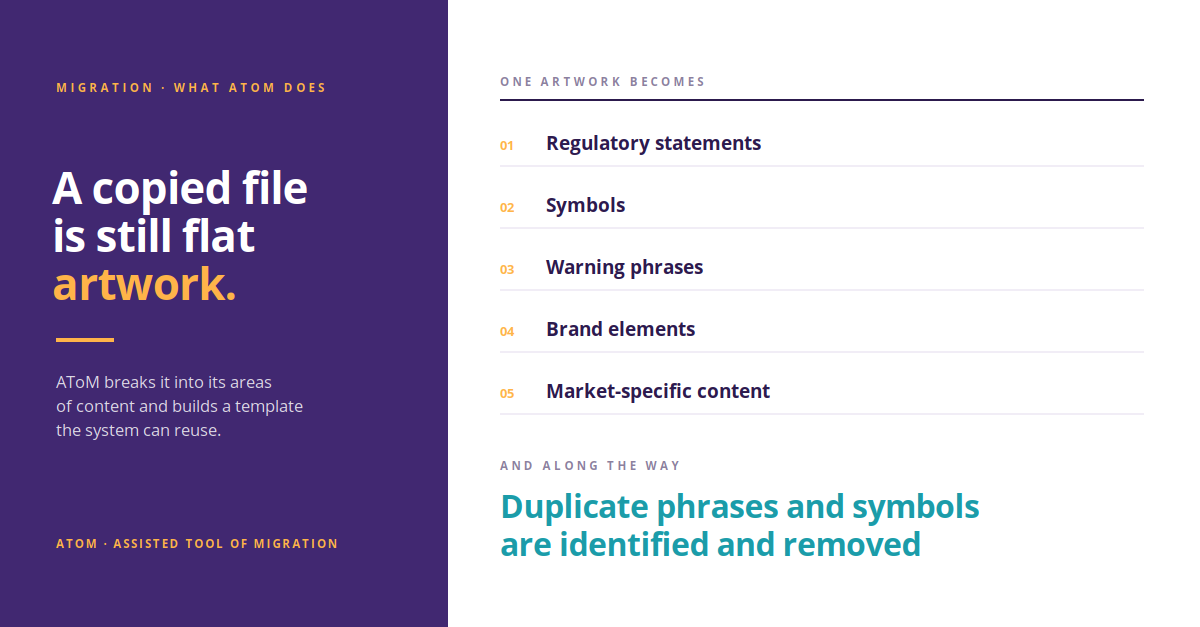
AToM (Assisted Tool of Migration) is the AI tool Kallik uses to bring your existing labels and artwork into Veraciti™. It doesn't simply copy files across, it reads them and does the work of an entire team with just one click.

Ed Briggs, Product Requirements Analyst at Kallik, describes the process from the inside: "We'll take your existing artworks and labels and we will migrate them into the Veraciti system. One of our migration users will drop this file into AToM. And what AToM will do is it'll start breaking down the existing artwork into its areas of content, and it will create a template based on the artwork supplied."

That distinction matters. A copied file is still a flat piece of artwork. A structured template is a set of components – regulatory statements, symbols, warning phrases, brand elements, market-specific content – that the system can recognize, reuse, and control. AToM extracts the content, identifies and removes duplicate phrases and symbols along the way, and builds reusable templates with regulatory and brand logic already embedded.

You come out of migration with a clean, structured, deduplicated label library rather than a digital filing cabinet full of the same mess you had before. And the part customers tend to find most interesting is that AToM isn't static – every correction a migration user makes feeds back into the model.

"It has a machine learning process," Ed explains, "so the more artworks you feed into the system, all of the data that migration users are putting in will build a greater machine learning. So in the future, the more artworks dropped into the file, the greater accuracy AToM will have when migrating artworks and labels into the Veraciti system."

In practice that means the back end of a large migration runs faster and more accurately than the front end. For enterprises with sprawling portfolios across multiple regions and product families – exactly the organizations for whom manual migration is most punishing – that curve is the whole point.

Faster


What it Looks Like at Scale


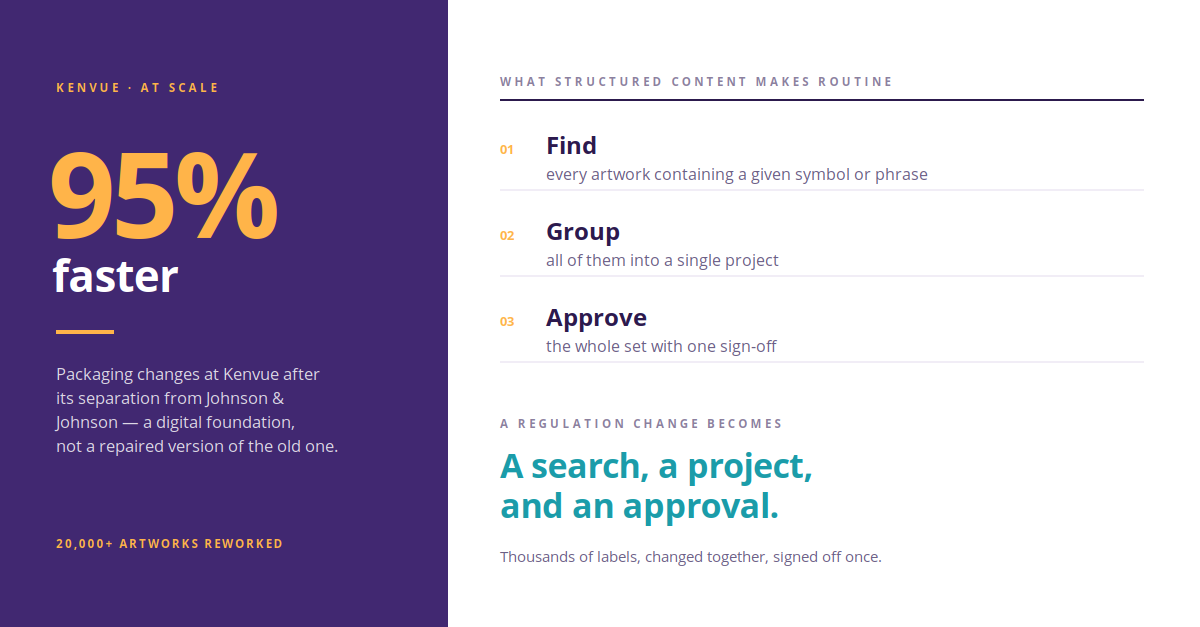
When Kenvue separated from Johnson & Johnson, it had to rework more than 20,000 artworks across a global brand portfolio. Working with Kallik and AToM, Kenvue removed the fragmentation across its label estate and cut its rework cycles, ending up with a digital foundation rather than a repaired version of the old one. Packaging changes now run 95% faster.
That number isn't really a migration statistic. It's what becomes possible once content is structured.


The Payoff Comes After Go-Live

Structured content is what turns a regulatory change from a project into a task. Once your labels are templates rather than files, Veraciti's Where Used feature lets you find every artwork containing a given symbol or phrase, pull them into a single project, update them together, and sign the whole set off at once. As Ed puts it, "this could be thousands of labels you could be changing for a regulation change with ease with a single sign-off, rather than having to go into each of these and manually adjusting them."

That capability only exists because AToM did the structural work up front. Migrate badly and every future regulation change is a manual sweep. Migrate properly and it's a search, a project, and an approval.


What This Actually Buys You

Shorter onboarding, so your investment starts returning sooner. Fewer errors introduced at the exact moment nobody is watching for them. A deduplicated content library instead of an inherited backlog. And a label estate that's ready for whatever the next regulation asks of it, rather than one that needs rebuilding first.

If the size of your archive is the reason you haven't moved yet, that's the specific problem AToM was built to solve. Book a demo and we'll show you what AToM does with your own artwork. Speak to our labeling and artwork experts by filling in a form here, or book a demo here.

Read our free guide on getting AI-ready

Learn how Kallik works<

FAQs about label artwork migration

What is AToM? 

AToM, or Assisted Tool of Migration, is the AI tool Kallik uses to bring existing labels and artwork into the Veraciti™ platform. Rather than copying files across, it reads each artwork, breaks it down into its areas of content, and builds a structured, reusable template from what it finds — identifying and removing duplicate phrases and symbols along the way.

Why is manual label artwork migration a compliance risk? 

Manual migration introduces variation at the exact point where nobody is checking for it. Values get retyped from legacy labels, inconsistent data fields get resolved by judgment call, and missing design files get recreated by eye. Repeated across hundreds of artworks, this seeds inconsistency into a library that is supposed to serve as a single source of truth — and because migration is usually treated as an IT project rather than a regulatory one, those errors often go unreviewed.

How does AToM turn existing artwork into reusable templates? 

A migration user drops the existing artwork file into AToM, which breaks it down into its areas of content and creates a template based on the artwork supplied. The distinction matters: a copied file remains a flat piece of artwork, while a structured template is a set of recognized components — regulatory statements, symbols, warning phrases, brand elements, and market-specific content — that the system can reuse and control.

Does AToM become more accurate over time? 

Yes. AToM uses a machine learning process, so every correction a migration user makes feeds back into the model. In practice this means the later stages of a large migration run faster and more accurately than the early ones — which matters most for enterprises with sprawling portfolios across multiple regions and product families.

Can AToM handle large label portfolios? 

Yes. When Kenvue separated from Johnson & Johnson, it had to rework more than 20,000 artworks across a global brand portfolio. Working with Kallik and AToM, Kenvue removed the fragmentation across its label estate and cut its rework cycles, ending up with a digital foundation rather than a repaired version of the old one. Packaging changes now run 95% faster.

What is the Where Used feature in Veraciti? 

Where Used identifies every artwork containing a given symbol or phrase, so a single regulatory change can be applied across all affected labels at once rather than label by label. Affected artworks are pulled into one project, updated together, and signed off in a single approval. The feature depends on content having been structured during migration, because flat artwork files cannot be queried this way.

What Are the Most Common Packaging Challenges in Mergers and Acquisitions?

What Are the Most Common Packaging Challenges in Mergers and Acquisitions?
Author Name
Kallik Role 1
Content Manager

The day you put your own logo on an acquired product, you become legally responsible for packaging you have almost certainly never seen the paperwork for. This does not come up in the deal room. It comes up in week three, when someone asks where the technical file for a particular carton is and the answer turns out to be a converter whose contract ended at close.

The most common packaging challenges in mergers and acquisitions are inherited compliance liability, approved artwork held by third parties, duplicate pack specifications, harmonizing regulatory copy across two portfolios, transferring extended producer responsibility registrations, and consolidating print suppliers. The unfortunate part is, almost all of them surface after close, when the integration clock is already running – but the good news is, there are ways to get ahead.


Who is Responsible For Packaging Compliance After an Acquisition?


Under the PPWR, the practical test for who counts as the manufacturer is whose brand appears on the packaging. If it is yours, the obligation to sign the Declaration of Conformity and hold the supporting technical documentation is yours, and you are the party auditable by market authorities. That responsibility stays with you even where a supplier or converter carried out the conformity assessment and prepared the file.

This matters at the exact moment an acquisition becomes visible on shelf. The day you rebrand an acquired product, you become the manufacturer of its packaging for PPWR purposes and inherit the evidence burden for it – every substance test result, recycled content claim, and material breakdown behind the declaration.

Most packaging diligence checklists were written before August 2026 and ask about volumes, formats, and supplier contracts. Very few ask to see the technical documentation. If it does not exist, or exists only in fragments across the seller's supply chain, you find out after you own it.


Where is Approved Packaging Artwork Actually Stored?


In most regulated manufacturers, print-ready artwork sits with design agencies, repro houses, and printers, and the acquired business holds reference PDFs rather than editable source files.

The contracts holding those relationships together frequently terminate at close. So the practical position on day one is that you own a SKU list, a set of flat PDFs, and no working files – while the people who can produce a corrected pack are no longer engaged. Establishing where every approved asset physically lives, and who has the right to release it, is worth doing during diligence rather than during your first regulatory change.


What Happens to Duplicate SKUs and Pack Specifications?


Portfolio rationalization gets treated as a commercial decision, but it is a data problem first. After close you hold two pack format libraries, two sets of dielines, two substrate specification systems, and two symbol libraries – and the two sides describe the same physical pack in incompatible terms.

You cannot rationalize what you cannot compare. Before anyone can decide which of two near-identical cartons survives, someone has to establish that they are near-identical, which means normalizing two specification vocabularies into one. That work is unglamorous, sits on the critical path for every synergy target attached to packaging, and is almost never scoped.


How Do You Harmonize Regulatory Copy Across Two Portfolios?


Harmonization is usually framed as process and culture alignment. In packaging it is narrower and considerably more expensive: two companies phrase the same warning differently, hold different translation sets, use different symbol conventions, and make subtly different claims about equivalent products.

Someone has to decide which version wins, per phrase, per market. That is a regulatory decision, repeated at scale, and it needs regulatory affairs sign-off rather than design sign-off. Teams that treat it as a branding exercise discover the difference at the first audit.


Do EPR Registrations Transfer When a Brand Changes Hands?


Extended producer responsibility registrations are held by a registered producer entity in each member state, not by the brand. A change of ownership generally requires action in every market where the packaging is placed, rather than transferring automatically with the asset.

The gap between close and completed re-registration is the exposure. Product continues moving; the obligation to report and pay against it has to sit with somebody, and transition service agreements do not always say clearly which somebody.


What Changes in a Divestiture or Carve-Out?


Everything above, run in reverse and under a harder deadline. You are stripping your identity off packs you no longer own while assembling artwork packages for a buyer, against a transition services clock set during negotiation rather than by anyone who has done a packaging migration.

Divestitures also expose asset custody faster than acquisitions do. You cannot hand over what you cannot locate, and the discovery that a printer holds your only editable file for a divested brand tends to arrive late.


Where the Obligations Sit


Obligation

Before close

After close

PPWR Declaration of Conformity

Seller, as brand owner

Buyer, from the point the pack carries its brand

Technical documentation

Held by seller, often assembled by suppliers

Buyer must hold and be able to produce it

EPR registration and reporting

Seller's registered entity, per member state

Requires re-registration in each market

Approved artwork source files

Frequently with agencies or printers

Unchanged unless custody is transferred deliberately

Regulatory copy decisions

Independent per company

Must be reconciled phrase by phrase


Getting ahead of it


The pattern across all six is the same: packaging obligations are attached to data that no one has consolidated, and the deal timetable assumes that consolidation is quick. It is quick only where a single source of truth already exists.

Kallik's Veraciti™ platform is built for exactly this position – bringing artwork, specifications, and regulatory content into one governed system so that a change of ownership becomes a data operation rather than a rebuild. If you are heading into a transaction and want to talk through what integration would actually involve, get in touch.
 

FAQs: packaging in mergers and acquisitions

Does a Declaration of Conformity transfer with an acquired brand?

Not automatically in any useful sense. Once the packaging carries the acquiring company's brand, that company is treated as the manufacturer and needs its own declaration supported by technical documentation it holds. Obtaining the seller's evidence file during diligence is what makes that possible.

How long does packaging artwork migration take after a merger?

It depends almost entirely on where the source files sit and how consistently the acquired portfolio was specified. Migrations from a single governed system take weeks. Migrations from mixed agency and printer custody take months, and the variable is asset discovery rather than production.

What should packaging diligence cover that financial diligence does not?

Custody of editable artwork files, PPWR technical documentation and declarations, EPR registrations by member state, printer and agency contract termination terms, and the specification vocabulary used across the portfolio.

Is PPWR fully in force?

No. Obligations covering declarations of conformity, technical documentation, manufacturer identification and substance restrictions apply from 12 August 2026. Requirements including harmonized labeling, recyclability grades, packaging minimisation and deposit return systems arrive in later phases through 2030.

FDA Uncertainty and Cosmetics Labeling: How to Prepare Without a Deadline

FDA Uncertainty and Cosmetics Labeling: How to Prepare Without a Deadline
Author Name
Kallik Role 1
Content Manager
Blog Related to Regulation Page

If the FDA published the fragrance allergen rule tomorrow morning, how long would it take you to update every affected label? Not to work out which ones are affected. To actually change them, route them for approval, and get them to print.

Most people we put that question to can't answer it, because the question has simply never needed answering before, because regulators used to arrive with a date attached, and a date lets you build a plan around it.

Right now though? There's no date and there's barely an agency to ask either, so you’d be forgiven for feeling a little stressed and uncertain if you work in the cosmetics space right now.


What FDA Leadership Changes Mean for Cosmetics Brands


We speak to regulatory and packaging teams across the sector regularly, and the tone has shifted noticeably this year. People aren't confused about what's coming – they've read the same information as everyone else. Instead, they’re stuck waiting to see when that set of obligations will land eventually, on a schedule set by an agency in the middle of its own upheaval, hitting product ranges that in some cases run to thousands of SKUs.

We’ve heard it described as packing for a trip without knowing the destination or the departure date. You know you'll need to move fast, but you just can't do anything with that knowledge yet.


Why Delayed Regulations Increase Labeling Workload and Risk


Delay often feels like relief, like the pressure is off and you can take a step back. In actual fact, it’s the complete opposite.

Every month a rule sits unpublished, the eventual compliance window doesn't get longer. It gets denser. The work doesn't evaporate during the wait. Instead it accumulates, then arrives in a single lump, competing with the launches, seasonal packs, and market variants already sitting in your queue.

So the thing worth focusing on isn't the date. It's the lag: the number of days between a rule landing and your last affected label being approved and out the door.

That number belongs entirely to you. It's determined by how your labeling operation is built, and unlike the FDA's timetable, you could change it – and it’s probably quicker and easier than you think!


What Slows Down Cosmetics Label and Artwork Updates


The thing slowing down cosmetic label and artwork updates is rarely the change itself, but rather finding the change and making it accurately. When label content lives inside artwork files, every ingredient statement is a separate object. Update one allergen declaration across 800 SKUs and you're opening 800 files. Answering "which of our products contain this?" becomes a manual audit rather than a search.

Then there's sign-off. Approval routed through email and shared drives is slow at normal volumes and falls over at high ones. Version control gets fuzzy, people chase, and eventually someone approves the wrong proof. Structured artwork approval fixes this by making the route itself the record, so the audit trail builds as people work rather than being reconstructed from inboxes six months later.

Cloud-based label and artwork systems matter more here than they might sound like they should. Regulatory work is distributed now. A supplier in one country, a reviewer in another, a print partner somewhere else again. Everyone needs the current version, not a current version.

Put those pieces together and the shape of the problem changes. Label content becomes reusable components rather than text welded into a file. One approved change flows through to every product that uses it. Where-used search returns the affected list in seconds instead of weeks. A regulatory update stops being an event and becomes a task.


Is Labeling Software Worth the Investment?


We get it, managing emails and spreadsheets is practically free, whereas investing in software can be costly. It’s true, enterprise labeling software is a real investment and the payback doesn’t happen immediately.

But look at what the alternative really costs. We’re talking about the hours spent hunting SKUs, the rework when an outdated ingredient list reaches print, and the launches held up because artwork is stuck behind a compliance scramble. Nevermind the reputational, monetary and even life-threatening consequences of a recall! Reality is, those costs are being paid by your business right now, just spread thinly enough that nobody puts them on a line item. And the volume of regulatory change heading toward this sector isn't going to make them smaller.


Moving Legacy Labels Into a New System Without the Pain


If cost isn’t your objection to making the move, we can almost bet the migration process is what’s holding you back. Nobody wants to hand over a decade of legacy artwork and hope it comes out the other side intact.

If that's the thing holding you back, it's worth knowing our platform uses a migration tool called AToM to handle exactly this. It reads your existing labels and artwork and converts them into structured, reusable content, which turns onboarding from a multi-year manual slog into something considerably shorter and a great deal less painful.


Preparing for FDA Changes Without a Deadline


Here's the short version of all this. The uncertainty is real, and it isn't going away soon. But the reality is, setting the regulation date was never the part you controlled. What you control is what happens the day after it's announced. Whether that day means a room full of people opening artwork files one at a time, or a where-used search, one approved change, and a normal week.

That difference isn't down to how well your team knows the regulations. It's down to whether your label content is structured, your approvals are traceable, and your system is accessible to everyone who needs it. Get those three things right and regulatory change stops being an emergency.

The teams that will handle the next FDA announcement calmly are already making that change now, while there's no deadline forcing them to. That's the advantage of the current lull. You can't control when the FDA moves, but you can control whether that day is a scramble or just a Tuesday.

If you’re ready to make the move and transform your label and artwork management for the better, speak to one of our experts. Call us on +44 (0) 1827 318100, email enquiries@kallik.com, or fill in a form here.

Get clued up on MoCRA requirements

Learn how Kallik works

Frequently asked questions

What is happening with FDA leadership?

Commissioner Marty Makary resigned in May 2026, prompting a series of senior departures across the agency. Kyle Diamantas has been serving as acting commissioner since. In August 2026, Dr. Heidi Overton was nominated as the next commissioner, subject to Senate confirmation. Separately, the FDA's Office of Cosmetics and Colors moved out of the Center for Food Safety and Applied Nutrition into the Office of the Chief Scientist in 2024.

Which FDA cosmetics rules are still pending?

Final rules on Good Manufacturing Practice, fragrance allergen disclosure, and standardized talc testing methods are all still outstanding, along with the FDA's assessment of PFAS in cosmetics. Fragrance allergen disclosure is the one most likely to require widespread label changes, since it is expected to affect ingredient statements across large portions of a product range.

Do FDA delays give cosmetics companies more time to prepare?

Not in practice. A delayed rule does not extend the compliance window once it is published, it simply concentrates the work into a shorter period. The label changes still have to happen, but they arrive as a single block of work competing with launches, seasonal packs, and market variants already in the queue.

How long does it take to update labels across thousands of SKUs?

It depends entirely on how label content is stored. Where content sits inside individual artwork files, each affected SKU has to be identified and edited separately, which can take weeks or months. Where content is managed as reusable components, a where-used search identifies affected products in seconds and a single approved change flows through to all of them.

How can cosmetics companies prepare for FDA rules that have no deadline?

Focus on the lag rather than the date. That means the number of days between a rule being published and every affected label being updated, approved, and sent to print. Structuring label content, making approval routes traceable, and moving to a cloud-based system all reduce that number, and none of them require knowing when the rule lands.

Preventing Packaging Artwork Failures in 2026

Preventing Packaging Artwork Failures in 2026
Author Name
Kallik Role 1
Content Manager

Packaging artwork failures cost regulated manufacturers far more than reprinting labels. A single labeling error in pharma, medical devices, or chemicals can trigger recalls, regulatory fines, and serious patient safety risks. According to a 2026 Fonteum analysis of FDA enforcement data, labeling and packaging issues are among the top reasons for device recalls. Kallik helps regulated manufacturers prevent these failures through packaging artwork management built for compliance-first workflows.


Why Packaging Artwork Failures Happen in Regulated Industries


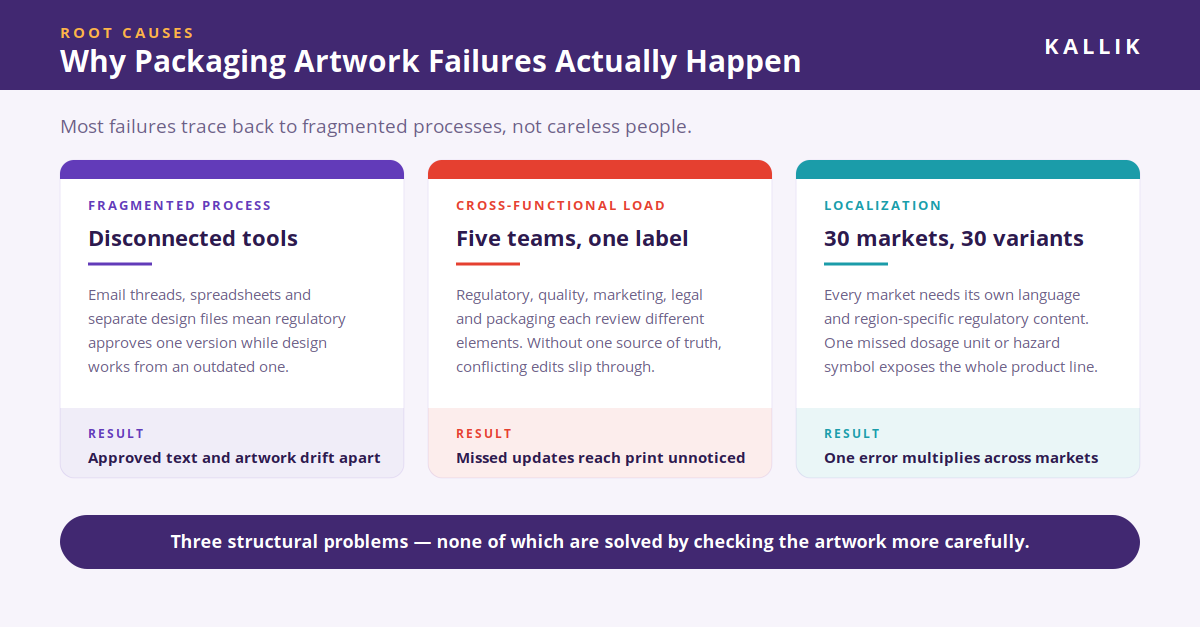
Most artwork failures trace back to fragmented processes, not careless people. When teams rely on email threads, spreadsheets, and disconnected tools to manage label content, version confusion becomes inevitable. A regulatory affairs team might approve one version of a label text while the design team works from an outdated file.

Cross-functional complexity makes things worse. Artwork approvals in regulated manufacturing typically involve regulatory affairs, quality assurance, marketing, legal, and packaging engineering. Each stakeholder reviews different elements, and without a single source of truth, conflicting edits and missed updates slip through.

Translation and localization add another layer of exposure. A product sold across 30 markets needs 30 language-specific label variants, each with region-specific regulatory content. One missed dosage unit change or an incorrect hazard symbol can result in non-compliance across an entire product line.
 

Artwork graphic root causes


The Real Cost of Getting Artwork Wrong


The consequences of artwork failures extend well beyond the cost of reprinting. In the FDA's enforcement database, labeling and packaging errors rank as a leading reason for device recalls. For drug products, recall-related disruptions can reduce after-tax profits significantly when products ship late.

Regulatory penalties add up quickly. Non-compliance with standards like EU CLP or FDA 21 CFR Part 211 can result in fines, warning letters, and market withdrawal. Then there are the indirect costs: lost retailer contracts, supply chain disruptions, and the slow erosion of brand trust that follows a public recall.


Where Artwork Workflows Break Down


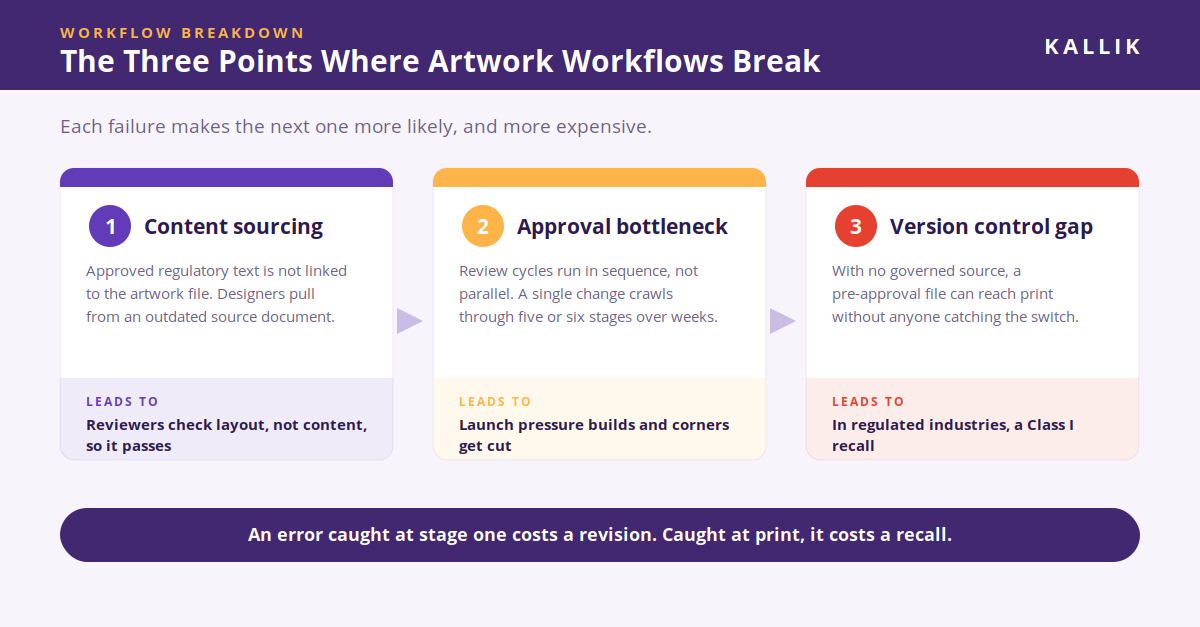
Three breakdown points appear repeatedly in regulated artwork workflows. First, content sourcing errors occur when approved regulatory text is not properly linked to the artwork file. Designers may pull from an outdated source document, introducing discrepancies that reviewers miss because they are checking layout, not content accuracy.

Second, approval bottlenecks form when review cycles run in sequence rather than in parallel. In some organizations, a single label change can take weeks to move through five or six approval stages. This delays product launches and increases the pressure to cut corners late in the process.

Third, version control gaps create the conditions for the most dangerous errors. Without governed artwork management, teams may accidentally release a pre-approval version to print. In regulated industries, that kind of failure can trigger a Class I recall.
 

Artwork graphic workflow breakdown


How to Prevent Artwork Failures Before They Start


Prevention starts with centralizing your artwork and label content in a single governed platform. When all regulated text, symbols, translations, and design files live in one controlled environment, you eliminate the version confusion that causes most errors. Kallik's Veraciti platform gives you this kind of centralized control, connecting label content directly to artwork workflows so that every change is traceable.

Structured approval workflows are equally important. Configurable, role-based review paths ensure the right people review the right elements at the right stage. Parallel review capabilities reduce cycle times without sacrificing rigor. And built-in audit trails capture every action, so you can demonstrate compliance during inspections without scrambling for documentation.

Automated change propagation closes the remaining gap. When a regulatory update affects a specific phrase or symbol, an integrated platform can identify every label and artwork file that uses that content and flag them for review. This kind of impact analysis is what separates reactive error correction from proactive failure prevention.


Building a Failure-Proof Artwork Operation


Technology alone does not solve the problem, unfortunately. You also will need clear process governance. Define ownership for each stage of the artwork lifecycle: who initiates a change request, who reviews regulatory content, who gives final quality approval, and who authorizes print release.

Integrate your labeling platform with upstream systems like ERP, PLM, and regulatory information management tools. When product data flows automatically into your labeling system, you remove the copy-paste operations that introduce human error at scale.

Finally, treat your artwork operation as a strategic function, not an administrative task. The organizations that invest in structured, governed artwork workflows are the ones that bring compliant products to market faster, avoid costly recalls, and maintain the regulatory confidence their customers and patients depend on.


How to Protect Your Artwork Process from Failure


Packaging artwork failures in regulated manufacturing are preventable. They start with fragmented processes and disconnected tools, and they end with recalls, fines, and lost time. By centralizing content, structuring approvals, and automating change propagation, you can build an artwork operation that delivers compliant labeling every time.

Ready to change your label and artwork management process for the better and prevent failures for good? Speak to one of our experts by emailing enquiries@kallik.com, calling +44 (0) 1827 318100 or filling in a form.
 

Packaging artwork management: FAQs

What are the three main breakdown points in a regulated artwork workflow?

Regulated artwork workflows typically break down in three places: content sourcing, approvals, and version control. Content sourcing fails when approved regulatory text is not linked to the artwork file, so designers pull from an outdated source document. Approvals fail when review cycles run sequentially through five or six stages instead of in parallel. Version control fails when there is no governed release gate, allowing a pre-approval file to reach print.

Why do reviewers miss content errors in packaging artwork?

Reviewers miss content errors because they are checking layout, not content accuracy. When approved regulatory text is not systematically linked to the artwork file, a discrepancy introduced at the design stage — an old dosage unit, a superseded warning phrase — passes visual review because nothing prompts the reviewer to verify it against the source. Linking label content directly to artwork removes the assumption that someone else has already checked it.

How does multi-market localization increase labeling compliance risk?

Localization multiplies risk because every market variant carries its own regulatory content, not just a translated version of the same content. A product sold across 30 markets needs 30 language-specific label variants, each with region-specific requirements. A single missed dosage unit change or an incorrect hazard pictogram can put an entire product line out of compliance across every market that shares that content.

What is automated change propagation in label and artwork management?

Automated change propagation is the ability to identify every label and artwork file affected by a change to a specific phrase, symbol, or data element, and flag them all for review. When a regulator updates a required hazard statement, for example, the platform performs impact analysis across the full artwork library instead of requiring teams to search manually. This is what shifts an operation from reactive error correction to proactive prevention.

Can artwork approvals be made faster without weakening compliance?

Yes — by running reviews in parallel rather than in sequence. Sequential routing through regulatory affairs, quality assurance, marketing, legal, and packaging engineering can stretch a single label change into weeks, which creates pressure to cut corners late in the cycle. Configurable, role-based workflows let each function review only the elements it owns, at the same time, with audit trails capturing every action.

Which upstream systems should a labeling platform integrate with?

A labeling platform should integrate with ERP, PLM, and regulatory information management (RIM) systems. When product data flows automatically from these sources into the labeling environment, the manual copy-paste operations that introduce human error at scale are eliminated. Integration also keeps label content synchronized when a product specification or regulatory submission changes upstream.

AI Won't Fix Bad Data: Why Regulated Industries Are Sitting on a Compliance Timebomb

AI Won't Fix Bad Data: Why Regulated Industries Are Sitting on a Compliance Timebomb
Author Name
Kallik Role 1
Content Manager

There's a lot of noise right now about what AI can do for labelling and artwork management. Less is being said about what it can't do: turn messy, fragmented data into something trustworthy.

That's the warning Kallik is putting out to regulated industries this month. As the global leader in enterprise labelling and artwork management software, working with brands including Kenvue, Cardinal Health and Procter & Gamble, we're seeing a pattern that worries us: companies under pressure are adopting AI tools before they've sorted out the "operational basics." And in pharma, med device, and other highly regulated sectors, that gamble carries real consequences.


The squeeze that's driving the rush


It's not hard to see why teams are reaching for AI. Regulatory overhauls across the US and Europe are approaching fast, skills shortages are leaving already-stretched teams struggling to manage increasingly complex product lifecycles, and there's constant pressure to protect margins while getting products to market quickly.

Faced with all that, automation looks like the obvious answer. AI tools promise to handle intricate labelling updates, multi-language translations and shifting regulations at a pace manual, under-resourced teams simply can't match. The problem isn't the ambition. It's what happens when that ambition meets poor foundations.
 

The AI compliance timebomb in labeling and packaging


Panic buying meets fragmented data


We're calling it panic buying for a reason: businesses are deploying AI checking mechanisms on top of siloed, inconsistent data, and that combination opens the door to serious compliance errors.

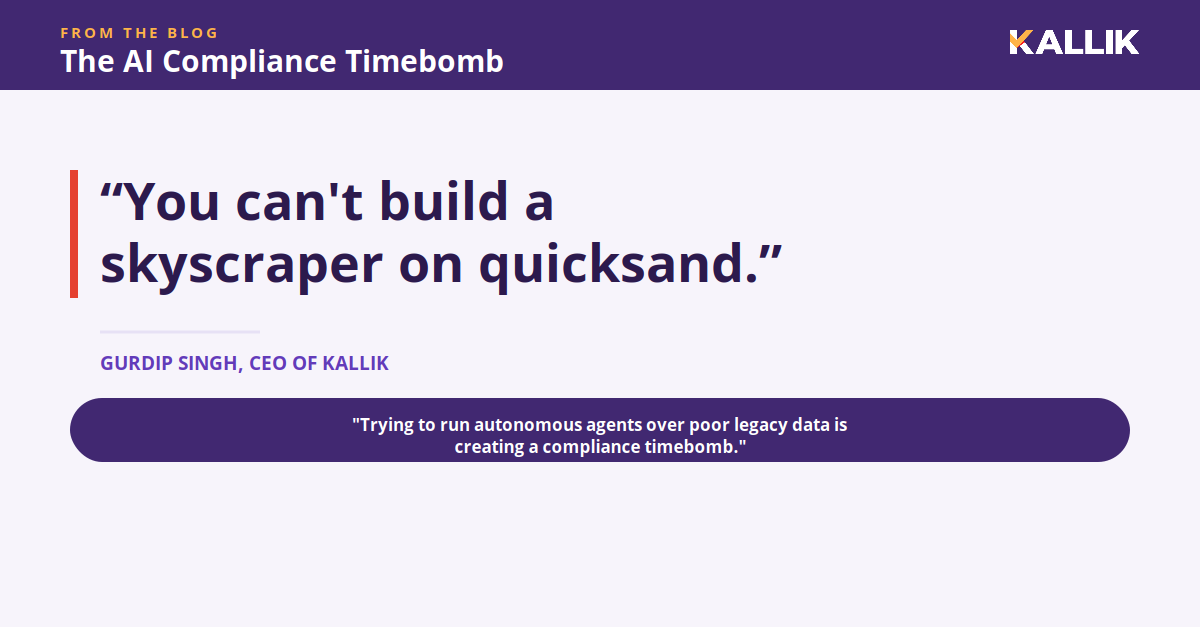
Gurdip Singh, CEO of Kallik, puts it bluntly: "There's a massive amount of noise in the market right now about what AI can do, but trying to run autonomous agents over poor legacy data is creating a compliance timebomb. One that pharma and med device manufacturers will absolutely want to avoid."

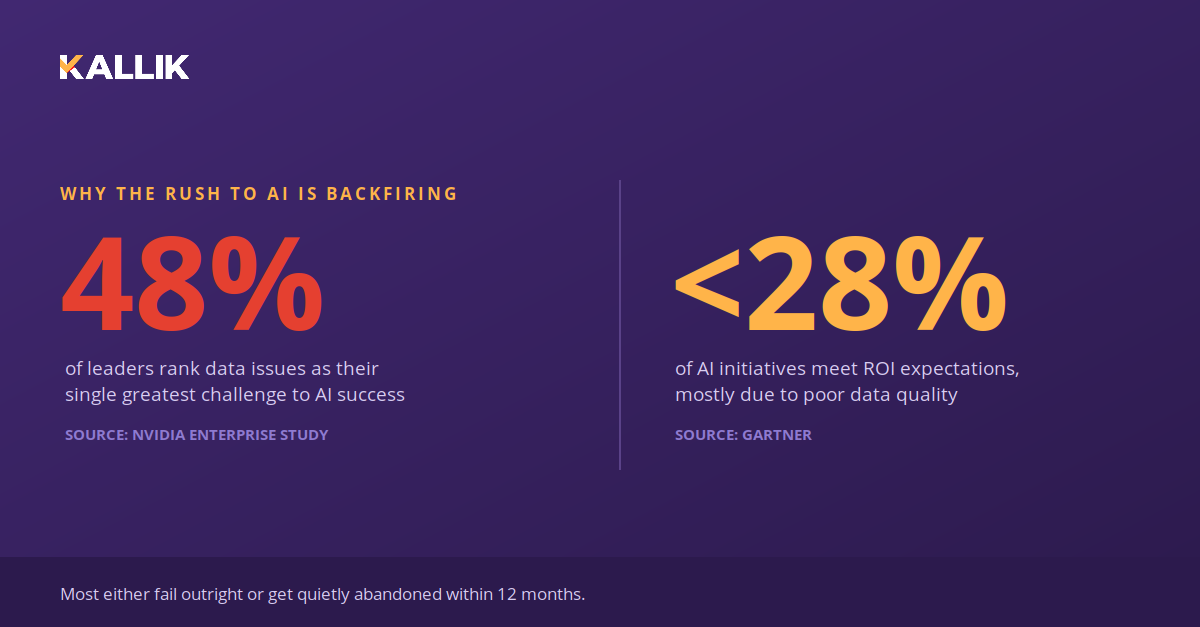
It's not an isolated concern either. A recent NVIDIA enterprise study found that 48 percent of leaders rank data-related issues as their single greatest challenge to successful AI implementation. As Gurdip puts it: "You can't build a skyscraper on quicksand."

48% of leaders rank data issues as their single greatest challenge to AI success


What actually goes wrong


When an AI tool queries unchecked, fragmented data, it starts connecting the wrong dots. That might mean silently dropping a European date format into a US template, or subtly altering a mandatory font.

In a low-stakes environment, that's an annoyance. In pharma or med device labelling, it's a different story entirely. A tiny hallucination like that can break the entire chain, triggering compliance failures, reputational damage and multi-million-pound product recalls, each one putting patients at risk.

This isn't a fringe issue, either. A global Gartner study found that fewer than 28 percent of AI initiatives meet ROI expectations, largely because of poor data quality. Most either fail outright or get quietly abandoned within 12 months.


Fixing the foundation first


This is why Kallik built its approach around data before automation, not the other way round. Our innovative migration tool, AToM (Assisted Tool of Migration), is a pure AI-driven engine that intelligently reads and extracts data from legacy formats at the onboarding stage, eliminating the manual input errors and duplicates that feed AI hallucinations in the first place.

That clean, accurate data then feeds directly into Veraciti™, our cloud-native single source of truth. Veraciti™ atomises content into pre-approved, version-controlled building blocks within a central asset and phrase manager. Because the data layer is fully structured, Veraciti™ stays entirely vendor-agnostic, so enterprises can securely plug and play any corporate LLM or external AI tool into a validated environment via secure APIs.

"We still continue to see businesses storing their data in spreadsheets or on old, outdated software, either updated by several different people across various departments, or by no one at all," Gurdip says. "So if you don't know what 'language' your data speaks, or whether it's the very latest version of information, your AI certainly won't."
 

Don't adopt AI on top of a labeling mess


The stress test regulated industries can't afford to fail


Gurdip concludes: "This new wave of AI adoption in the industry feels like a new kind of stress test. Advanced automation can easily handle massive data migrations and instant multi-language updates at lightning speed, but it requires an absolute single source of truth to pull from. Without that ironclad data, you are effectively letting an autonomous system fly blind into a regulatory storm."

For regulated industries, the message isn't "don't adopt AI." It's "don't adopt it on top of a mess." Get the data foundation right, and automation becomes a genuine advantage rather than a hidden liability.

We've spent years inside exactly this problem with global, regulated manufacturers. If your team has ever quietly wondered whether "organized" and "audit-ready" are actually the same thing, this is worth twenty minutes of your time before you commit to an AI roadmap, not after. 

Find Out If You're Actually AI-Ready →